Quick answer
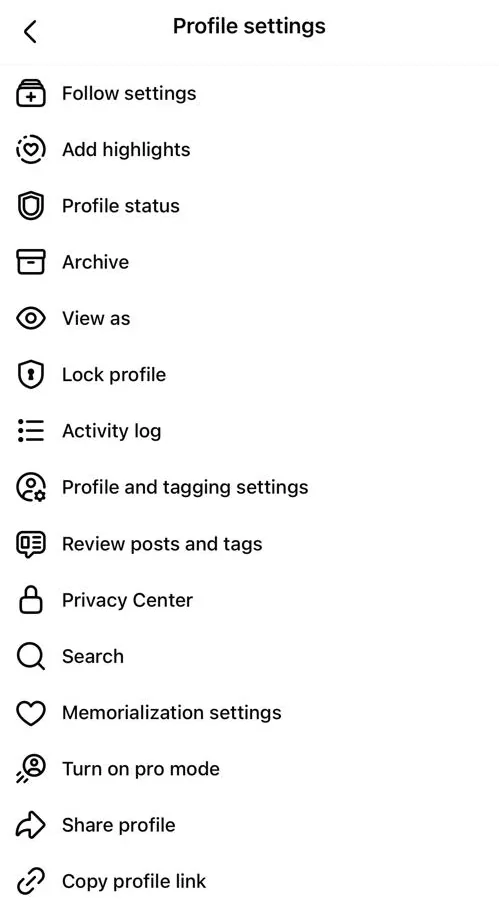
In the app, go to your profile, tap ⋯ at the top right > Profile settings > Lock profile > Lock your profile. On a computer, select Options below your name > Lock profile. Only your friends will then see the photos, posts and stories on your profile. Your current profile picture and cover photo can stay public, and strangers can still find you in search and send you friend requests and messages. Meta says profile lock is only available in certain countries, so many people don’t see it at all, and you can’t lock it while professional mode is on. If the option is missing, you can still choose the audience for each post. If someone else’s profile says Profile locked, they chose this and you aren’t friends with them. Nothing is wrong with your account.
Does this match what you see?
- You want strangers to stop seeing your posts and photos, all in one step.
- You can’t find Lock profile on your profile.
- You locked your profile and want to know what others can still see.
- You see Profile locked on someone’s profile and can’t see their posts.
- You lost your public followers after locking, and want them back.
iPhone & iPadAndroidComputer (browser)
Meta’s steps start from your own profile. Profile lock is only offered in certain countries, so you may not see it at all. Button names can differ slightly between the app and facebook.com.
Why this happens: the possible causes
Start with what you see.
| What you see | What it means | Go to |
|---|---|---|
| Lock profile in Profile settings (or under Options on a computer) | The feature is available to you | Fix 1 |
| No Lock profile option | Not offered in your country, professional mode is on, or it isn’t your main profile | Fix 2 |
| Unlock profile in Profile settings (or under Options) | Your profile is already locked | Fix 3 |
| Profile locked on someone else’s profile | They locked it and you aren’t friends | Fix 4 |
| “Your account has been locked” | A security lock on the whole account, not a privacy setting | Account locked |
- Profile lock is only in certain countriesCheck this first
Meta says profile lock is only available in certain countries. If it isn’t offered where you live, there’s no setting that turns it on. Use the alternatives in Fix 5.
- Professional mode is onCheck this first
Meta says you can’t lock your profile while professional mode is on.
- It isn’t your main profilePossible
You can only lock your main profile. Meta says additional profiles and Pages can’t be locked.
Try these 60-second checks first
- Make sure you’re on your own main profile, not an additional profile or a Page.
- In the app, tap ⋯ on your profile to open Profile settings; on a computer, look under Options below your name. Lock profile sits there.
- If you use professional mode, remember it blocks profile lock.
How to fix it, step by step
Work through these in order. They start with the quickest, safest checks and only move to steps that sign you out or remove data later.
Fix 1: Lock your profile
One setting limits what non-friends see on your profile. You don’t have to change the audience of every old post yourself.
iPhone & iPad
- Go to your profile.
- Tap ⋯ at the top right (next to the pencil and search icons) to open Profile settings.
- Tap Lock profile.
- Read the summary, then tap Lock your profile.
Android
- Go to your profile.
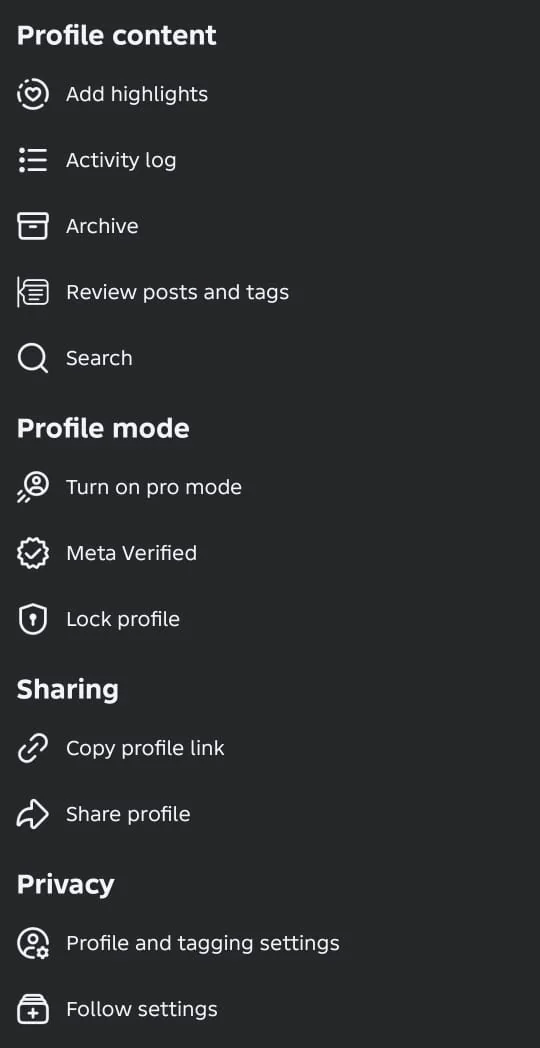
- Tap ⋯ at the top right of your profile to open Profile Settings.
- Under Profile mode, tap Lock profile.
- Read the summary, then tap Lock your profile. Facebook confirms with You locked your profile.
Computer (browser)
- Go to your profile.
- Select Options below your name.
- Select Lock profile.
- Select Lock your profile to confirm.

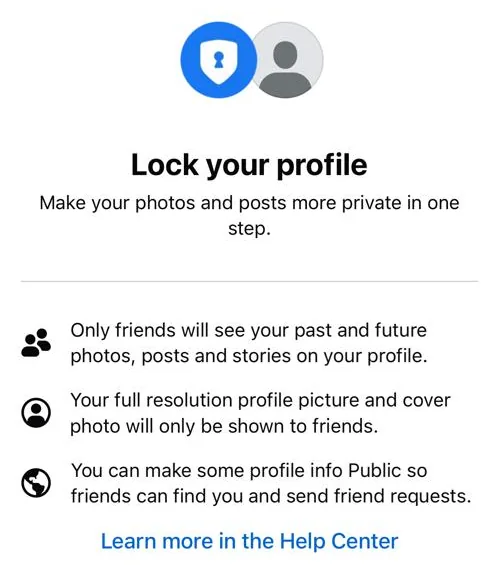
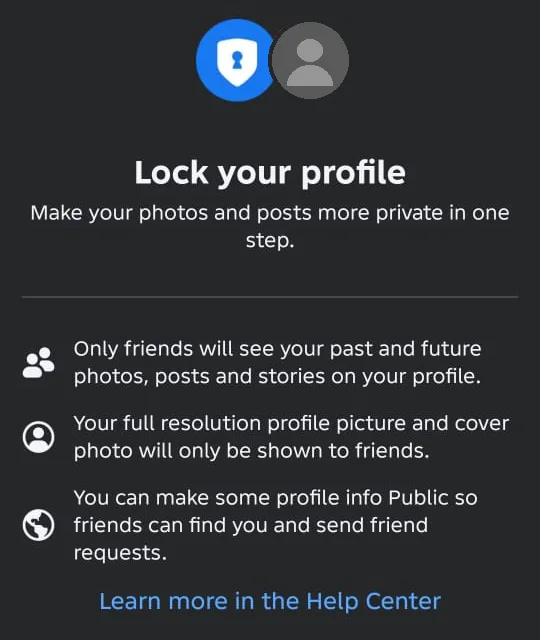
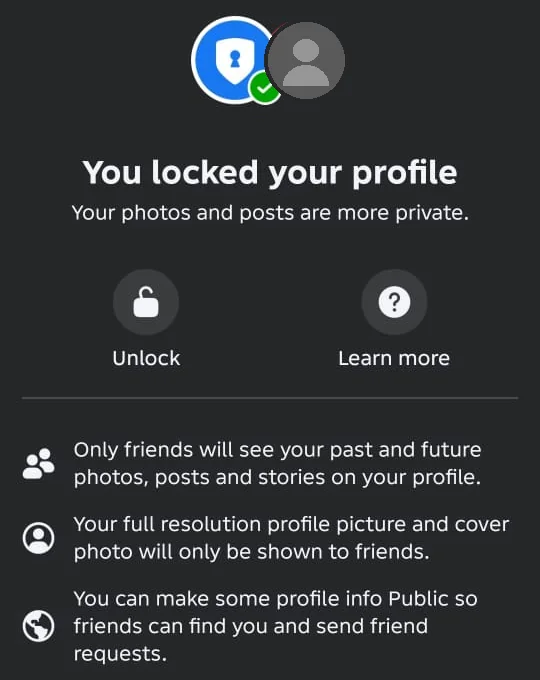
Facebook’s lock screen sums it up: only friends see your past and future photos, posts and stories on your profile, your full-resolution profile picture and cover photo are only shown to friends, and you can still make some profile info Public so friends can find you. Meta lists these effects of locking. Your past Public and Friends of friends posts change to Friends. Profile review and tag review turn on. Your follower setting becomes Friends, so you lose your public followers.
Did it work? Profile settings (or Options below your name on a computer) now shows Unlock profile, and your past Public posts now show Friends.
Did Fix 1 solve it?
Great, you fixed it with Fix 1. Tell us it worked, or bookmark this page in case it happens again.
Fix 2: No “Lock profile” option? Check these three things
Meta names three situations where you can’t lock a profile. Each has a different answer.
- Your country: Meta says profile lock is only available in certain countries. If it isn’t offered where you live, Meta doesn’t mention any way to add it. Don’t use a VPN to fake your location. Use Fix 5 instead.
- Professional mode: you can’t lock your profile while professional mode is on. Decide whether you still need it. Turning it off removes followers who aren’t friends and your insights: see turning pro mode off first.
- Additional profiles and Pages: only your main profile can be locked. Switch back to your main profile and look again.
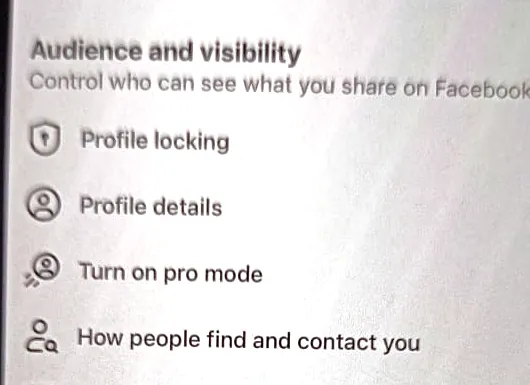
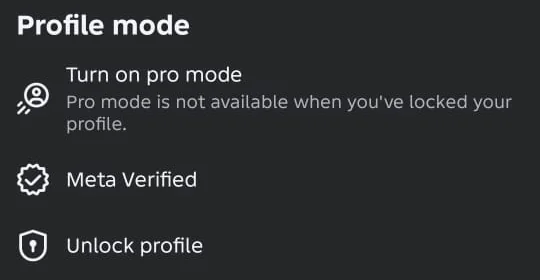
Also check Settings & privacy > Audience and visibility: some versions of the app list Profile locking there. The rule works both ways: while your profile is locked, Profile Settings on Android says “Pro mode is not available when you’ve locked your profile.”
Did it work? Either Lock profile now appears in Profile settings (or under Options), or you know it isn’t offered to you and can use Fix 5.
Did Fix 2 solve it?
Great, you fixed it with Fix 2. Tell us it worked, or bookmark this page in case it happens again.
Fix 3: Unlock your profile
Unlocking puts most things back as they were. Some changes you made while locked stay, though.
iPhone & iPad
- Go to your profile and tap ⋯ at the top right to open Profile settings.
- Tap Unlock profile.
- Read the screen, then tap Unlock your profile.
Android
- Go to your profile and tap ⋯ at the top right to open Profile Settings.
- Under Profile mode, tap Unlock profile.
- Read the screen, then tap Unlock your profile.
Computer (browser)
- Go to your profile and select Options below your name.
- Select Unlock profile.
- Select Unlock, then Unlock your profile.
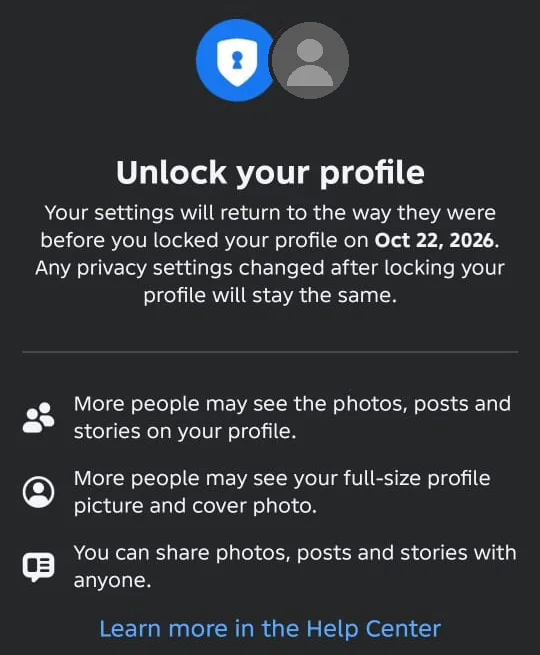
The unlock screen says your settings will return to the way they were before you locked your profile (it shows the date), and any privacy settings you changed after locking stay the same. Meta says posts that were Public before you locked go back to Public. Changes you made while your profile was locked stay as you set them. Want your public followers back? Meta says to unlock your profile and turn on professional mode within 60 days of locking.
Did it work? Profile settings (or Options) shows Lock profile again, and your earlier public posts are Public.
Did Fix 3 solve it?
Great, you fixed it with Fix 3. Tell us it worked, or bookmark this page in case it happens again.
Fix 4: Someone else’s profile says “Profile locked”
When people who aren’t friends with the owner visit a locked profile, they see Profile locked. It’s the owner’s choice, not a fault on your side.
- Only the owner’s friends can see the photos, posts and stories on a locked profile. There is no legitimate way around this.
- If you know the person, you can send a friend request. Meta says people can still send friend requests and messages to someone with a locked profile.
- Ignore apps, sites or people offering to “view locked profiles”. Meta’s help describes no such option, and these offers are a common way to steal Facebook logins.
Did it work? You understand that only the owner can change what you see.
Did Fix 4 solve it?
Great, you fixed it with Fix 4. Tell us it worked, or bookmark this page in case it happens again.
Fix 5: Can’t lock your profile? Choose the audience for each post
Every post has its own audience. Without profile lock you can still keep new posts to friends, which covers the most important part of what locking does.
- When you create a post, tap the audience button under your name (names differ between versions) and choose Friends (or a narrower option) instead of Public.
- For a post you’ve already shared, open the post’s ⋯ menu and look for an option to edit its audience. Names differ between the app and facebook.com.
- Remember that your profile picture and cover photo can stay public even on a locked profile, so choose those images with that in mind.
Did it work? Your new posts show Friends (or the audience you chose), not the globe icon for Public.
Did Fix 5 solve it?
Great, you fixed it with Fix 5. Tell us it worked, or bookmark this page in case it happens again.
What a locked profile hides, and what stays visible
This table sums up what Meta’s help page says changes for people who aren’t your friends once your profile is locked.
| For people who aren’t your friends | |
|---|---|
| Photos, posts and stories on your profile (past and future) | Hidden: only friends see them |
| Your profile picture and cover photo in full size | Hidden: only friends see the full-resolution versions |
| Your current profile picture and cover photo | Can still be public |
| Public details on your profile | Can still be public |
| Albums shared with others, and posts on Pages, Marketplace and public groups | Can still be public |
| Finding you in search | Still possible |
| Sending you friend requests and messages | Still possible |
| Seeing you in People You May Know | Still possible |
| Seeing the Pages you follow and your follower count | Still possible |
Locked profile vs locked account
They sound alike but are unrelated. Locking your profile is a privacy choice you make, and nothing is wrong with your account. “Your account has been locked” is a security lock from Meta, which can happen when it sees unusual activity. That needs you to prove the account is yours before you can use it. For that, see Facebook account locked.
Error messages and what they mean
These are the labels and messages Meta’s help page describes, and the closest matches you may see.
Profile locked- What it usually means
- Shown to people who aren’t friends with the profile’s owner. The owner chose to lock their profile.
- What to do
- Only the owner can change this. Fix 4
Lock profile option missing- What it usually means
- Not offered in your country, professional mode is on, or you’re on an additional profile or a Page.
- What to do
- Fix 2
Your account has been locked- What it usually means
- A security lock on the whole account, not a privacy setting.
- What to do
- See Facebook account locked.
How to know it worked
- Profile settings in the app (or Options on a computer) shows Unlock profile (so your profile is locked).
- Your past public posts now show a Friends audience.
- You know which parts of your profile can still be public.
Still not working? Your next steps
- If you can’t lock your profile because of your country, use Fix 5 for each post.
- If your profile was changed without you, or you suspect someone else is logged in, follow Facebook hacked.
- Report a bug: ☰ Menu > Help and support > Report a problem, follow the prompts until you reach Select product, then pick Profile.
Official help routes
SocialAppFix can’t see or change your account. For account decisions, recovery and appeals, only the platform’s own tools can help. These links go to the official sites.
Frequently asked questions
What happens when I lock my Facebook profile?
Only your friends can see the photos, posts and stories on your profile, and the full-size versions of your profile and cover photo. Your past Public and Friends of friends posts change to Friends. Profile review and tag review turn on, and you lose your public followers.
Can strangers still see anything on a locked profile?
Yes. Your current profile picture and cover photo, public profile details, and posts you share on Pages, Marketplace and public groups can still be public. People can still search for you, send friend requests and messages, and see the Pages you follow and your follower count.
Why can’t I lock my Facebook profile?
Meta says profile lock is only available in certain countries, can’t be used while professional mode is on, and only works on your main profile, not additional profiles or Pages.
Can I see a locked profile without being friends?
No. Only the owner’s friends see their posts, photos and stories. Anything offering to “unlock” or “view” locked profiles is a scam.
If I unlock my profile, do my old posts become public again?
Meta says posts that were Public before you locked go back to Public. Changes you made while your profile was locked stay as you set them.
I lost my followers after locking. Can I get them back?
Meta says to unlock your profile and turn on professional mode within 60 days of locking to get your public followers back.
Is a locked profile the same as a locked account?
No. A locked profile is a privacy setting you chose. A locked account is a security lock from Meta, and you’ll need to confirm it’s yours. See Facebook account locked.
Did this solve your problem?
Your answer stays in your browser — nothing is sent or stored. The “tell us” link opens your own email app.
Out of date or didn’t work? Email us — never include passwords or codes.
Sources and how we checked this guide
We base steps on the platforms’ own help pages and the phone makers’ official guides. Menu names change often and can differ by device, app version and region. Where a platform page could not be independently read, we link it so you can check the current wording yourself.
- Lock your Facebook profile (external site, opens in a new tab)
- Turn professional mode on for your profile (external site, opens in a new tab)
- Report That Something Isn’t Working on Facebook (external site, opens in a new tab)
Last reviewed 21 October 2026 by the SocialAppFix editorial team against the sources above. Next scheduled review: 19 April 2027. How we write and review guides.
What changed
- 22 October 2026: Linked to the new guide on turning professional mode on or off.
- 22 October 2026: Confirmed the iPhone route (profile ⋯ > Profile settings > Lock profile) from real iPhone screenshots.
- 22 October 2026: Added the confirmed Android route (profile ⋯ > Profile Settings > Profile mode > Lock profile / Unlock profile) and the lock, locked and unlock screens, from owner screenshots.
- 22 October 2026: Added that some app versions list Profile locking in Settings & privacy > Audience and visibility, with an iPhone screenshot.
- 21 October 2026: First published.
SocialAppFix is an independent guide and is not affiliated with or endorsed by Meta or Facebook. We never ask for passwords, login codes or payment to fix an account.